grpc
Geyser gRPC Data Slices: Receive Only the Bytes You Read
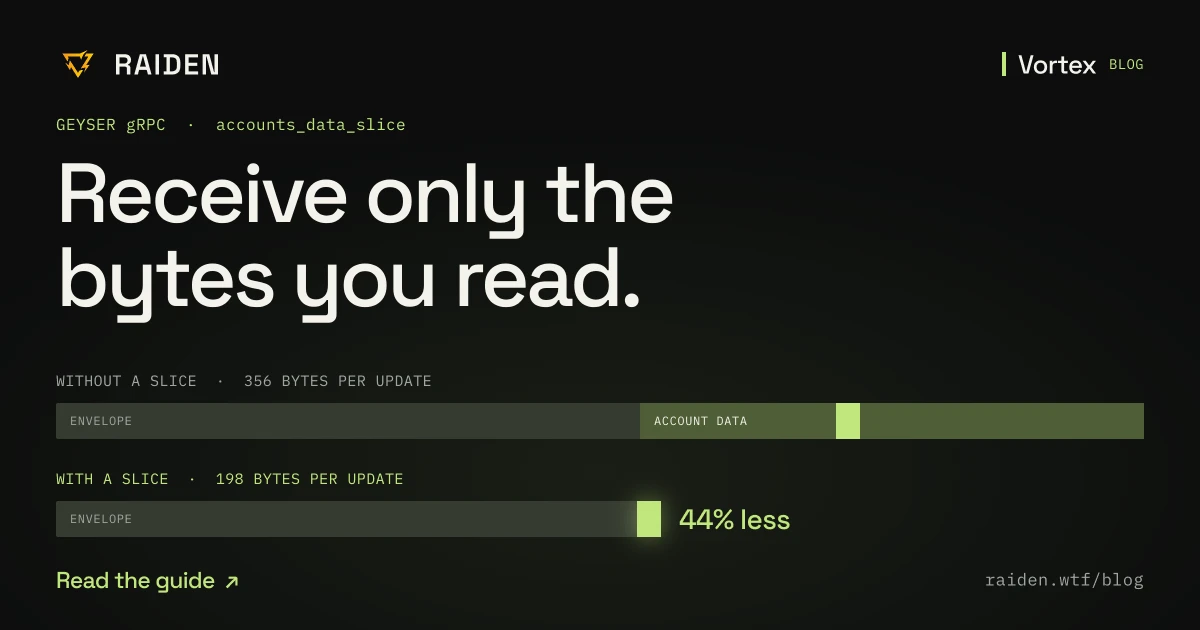
A bot watching 120,000 token accounts reads 8 bytes of each and receives all 165. One Geyser gRPC field, accounts_data_slice, cuts every update by 44%.
An arbitrage bot tracks pool reserves. To do that it watches the token accounts that hold each pool's funds, 120,000 of them, and reads one field from each: the balance.
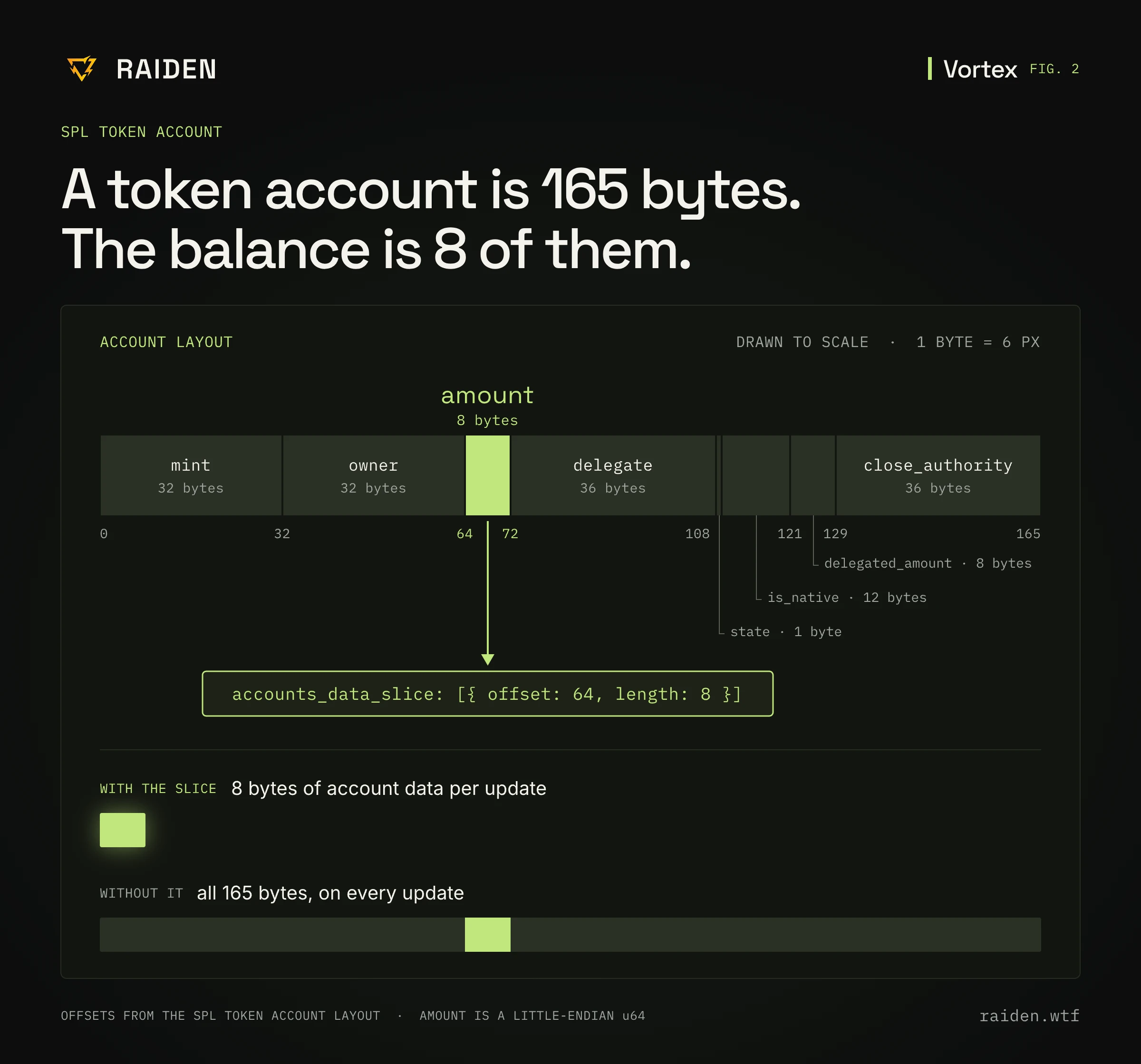
A token account is 165 bytes. The balance is 8.
Without any extra configuration, a Geyser gRPC stream sends all 165 bytes every time one of those accounts changes, inside an update that is 356 bytes on the wire. The bot reads 8 of them and throws 157 away, on every update.
Say each of those accounts changes once a second. On a 25 Gbps network card, that looks like this:
| Full account | Sliced | |
|---|---|---|
| Account data per update | 165 bytes | 8 bytes |
| Whole update on the wire | 356 bytes | 198 bytes |
| Network card time per update | 114 ns | 63 ns |
| Data per second | 42.7 MB (342 Mbps) | 23.8 MB (190 Mbps) |
| Network card time per second | about 13.7 ms | about 7.6 ms |
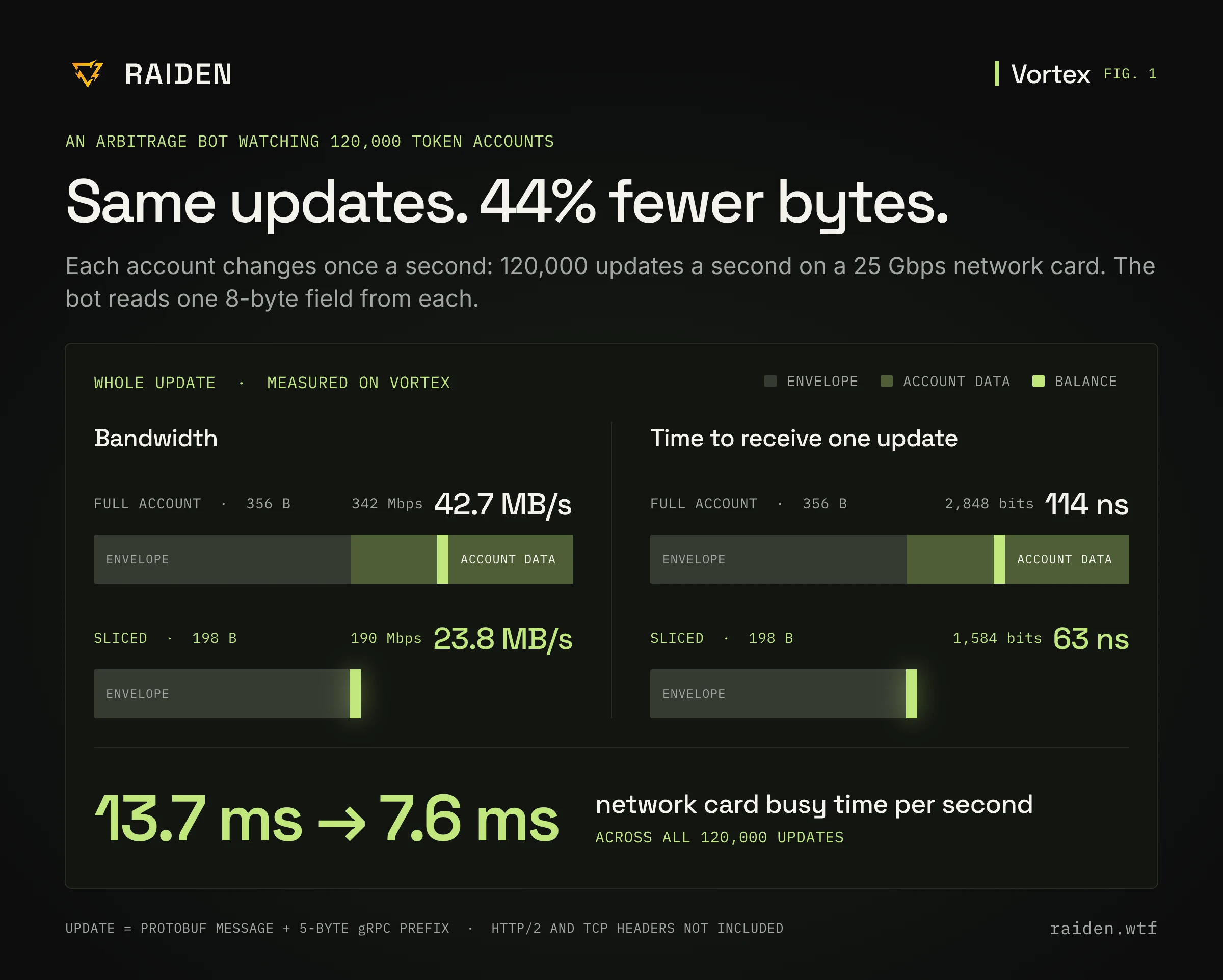
That is 44% less on the wire, from a 95% cut in the account data, and the difference is one field in the subscribe request: accounts_data_slice. This post explains what it does, where the time goes, and how to add it in TypeScript and Rust. It applies to any Yellowstone-compatible Geyser gRPC endpoint, including Raiden Vortex, where the update sizes in the table were measured.
What an account update carries
When you subscribe to accounts over Geyser gRPC, the server sends you a message every time one of those accounts changes. Each message has two parts:
- An envelope: the account address, its owner program, the lamport balance, the slot, a write version and the 64-byte signature of the transaction that caused the change. On Vortex this comes to about 185 bytes per update.
- The data: the account's full byte contents, as stored on chain.
The data is whatever size the account is: 165 bytes for a token account, a kilobyte or more for many pool accounts, tens of kilobytes for some order books. By default you get all of it, every time, even when one field changed and that field is the only one your bot reads. On a token account, the envelope is the larger of the two parts.
What a data slice does
A data slice tells the server which bytes of the data you want. You give an offset and a length, and the server sends only that range. The cut happens on the server, so the bytes you did not ask for never cross the network.
Here is the SPL Token account, drawn to scale:
| Field | Offset | Length |
|---|---|---|
| mint | 0 | 32 |
| owner | 32 | 32 |
| amount | 64 | 8 |
| delegate | 72 | 36 |
| state | 108 | 1 |
| is_native | 109 | 12 |
| delegated_amount | 121 | 8 |
| close_authority | 129 | 36 |
The arbitrage bot already knows the mint and the owner of every vault it watches, and those never change. The only field that moves is amount. So it asks for 8 bytes at offset 64, and that is all the account data it receives.
Where the time goes
Bandwidth is the saving you can see on a graph. The saving that matters to a trading bot is time.
Before your code can touch an update, its bytes have to arrive at the network card, one bit after another. How long that takes depends only on how many bytes there are and how fast the link is. On a 25 Gbps card:
- The full update is 356 bytes, or 2,848 bits. At 25 billion bits per second, that is 114 ns.
- The sliced update is 198 bytes, or 1,584 bits. That is 63 ns.
This time is paid on every update, always, before your bot can start processing. No optimization in your code can win it back, because your code has not started running yet. The only way to pay less is to receive fewer bytes.
Across 120,000 updates a second, the full updates keep the network card busy for about 13.7 ms of every second. Sliced, about 7.6 ms. To be precise about what that means: no single update arrives 13.7 ms late. Each full update costs 114 ns. The cost shows up when many accounts change at the same moment, which on Solana is the normal case, since a busy slot moves many pools at once. The updates arrive one after another, and the one your bot needs waits behind all the others. With slices, every update in that line is 44% shorter, and so is the wait.
After the network card there is a second cost of the same kind: every update is copied, decoded from protobuf, and handed to your code before you can look at the one field you wanted. A bot that receives less does less of that work too.
One note on the numbers. Each update size is the protobuf message as Vortex sent it, plus the 5-byte prefix gRPC puts in front of every message. HTTP/2 frame headers and TCP/IP headers come on top and add a few percent to both columns. The envelope is the part a slice cannot remove, so how much you save depends on how much of each update is account data. On a token account that is less than half, and the saving is 44%. On a 750-byte account, about the size of a Raydium AMM v4 pool, reading 16 bytes cuts the update from about 940 bytes to about 205: 78% less.
Adding a slice to your subscription
The slice is a field on the subscribe request, next to your filters. Nothing else about the subscription changes.
TypeScript
import Client, { CommitmentLevel } from '@triton-one/yellowstone-grpc';
import bs58 from 'bs58';

const VAULTS: string[] = [
  // the token accounts you want balances for
];

const client = new Client('http://fra.vortex.raiden.wtf:10001', undefined, undefined);
await client.connect();
const stream = await client.subscribe();

stream.on('data', (update) => {
  const info = update.account?.account;
  if (!info) return;

  // The slice starts at byte 0 of what you receive, not at byte 64.
  const amount = Buffer.from(info.data).readBigUInt64LE(0);
  console.log(bs58.encode(info.pubkey), amount);
});

stream.write({
  accounts: {
    vaults: { account: VAULTS, owner: [], filters: [] },
  },
  slots: {},
  transactions: {},
  accountsDataSlice: [{ offset: '64', length: '8' }],
  commitment: CommitmentLevel.PROCESSED,
});
Rust
use std::collections::HashMap;
use yellowstone_grpc_proto::prelude::{
    CommitmentLevel, SubscribeRequest, SubscribeRequestAccountsDataSlice,
    SubscribeRequestFilterAccounts,
};

let request = SubscribeRequest {
    accounts: HashMap::from([(
        "vaults".to_owned(),
        SubscribeRequestFilterAccounts {
            account: vaults, // Vec<String> of token account addresses
            ..Default::default()
        },
    )]),
    accounts_data_slice: vec![SubscribeRequestAccountsDataSlice {
        offset: 64,
        length: 8,
    }],
    commitment: Some(CommitmentLevel::Processed as i32),
    ..Default::default()
};
On the receiving side, account.data is now 8 bytes: u64::from_le_bytes(data[..8].try_into()?).
A named filter holds up to 5,000 accounts on Vortex and a connection holds up to 35 named filters, so 120,000 vaults are 24 named filters on one connection.
Four things to know before you use it
1. Offsets restart at zero. If you slice offset 64, length 8, the balance is at byte 0 of what you receive, not byte 64. Code written to parse the full account will read garbage from a sliced one. Parse the slice, not the layout.
2. The slice applies to the whole subscription. accounts_data_slice sits on the request, not on a named filter. Every account that matches any filter in that request is cut the same way. If you watch token accounts and pool accounts together, one slice cannot fit both layouts. Put them on separate connections, each with its own slice. Vortex allows 20 concurrent connections on every plan.
3. You can ask for more than one range. The field is a list. List the ranges by increasing offset and do not let them overlap: Vortex rejects a request that breaks either rule with INVALID_ARGUMENT. You receive the ranges joined together in that order, so two 8-byte slices arrive as 16 bytes. A range that runs past the end of an account is left out, so an account shorter than your slice arrives with no data at all.
4. You need to know the layout. A slice is only as correct as your offsets. Take them from the program's source or IDL, not from a guess. For Anchor programs, remember the 8-byte discriminator at the start of every account.
A short checklist
Before you connect an account subscription, ask of each account type:
- Which fields does my code read from it?
- At which offsets do they live, and how long are they?
- Can they be covered by one or two slices?
- Do my account types share a layout, or do they need separate connections?
If the answer to the first question is "one or two numbers", you should not be receiving the whole account.
Try it
Data slices work on any Yellowstone-compatible endpoint, so you can test this on the provider you already use: add the field, watch your inbound bandwidth, and compare.
If you want to try it on Raiden Vortex, it speaks the same geyser.proto your client already uses, so the change is one endpoint and one field. A free trial is available on request, and the team is on Discord (opens in a new tab) if you want help working out the offsets for the accounts you watch.